
Super Dimmer3.0 - Google Play
You'll be able to see results in few seconds.
Publisher Description
Get the PRO version here: https://play.google.com/store/apps/details?id=com.dberm22.SuperDimmerPro
Ever wake up in the middle of the night to check your phone, only to be blinded by the light? Your phone is on the lowest brightness setting but it still burns your eyes? Never have that happen again!
Super Dimmer not only dims your phone lower than the manufacturer or other third-party apps allow you to, but it also turns off the hardware buttons' backlight, and automatically turns itself on at night and off in the morning! It is also highly configurable - change the dimness level, when to turn on, when to turn off, etc.
You can also launch the application whenever you want, even if it is not night time. Worried about being obnoxious at a movie theater? No problem! Just launch this app, set it to manual mode by checking the "Ignore Power Toggle" button, and never feel self conscious again.
Due to popular request, I've reverted the app to allow for a clearable notification, this time with a setting. (notification can be completley hid in PRO version). However, due to the way Android works, checking this setting will lead to unstable behavior. It is NOT recommended. To avoid bright flashes, leave this setting as-is, with the non-clearable notification.
It has also been shown to save battery on certain devices (most Samsungs, Moto RAZR / RAZR MAXX, Nexus, and most Nokias)
Don't forget to add Super Dimmer to your exception list if you use a task killer!
----------------------------------------
USAGE:
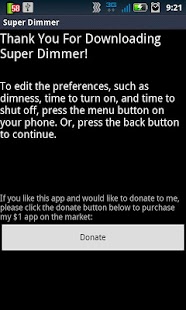
On first launch, hit the menu button and configure the settings to your liking. Hit "Apply Settings" when happy. If it is not within the time you set for the app to turn on, toggle the power to turn it off. Or, buy the Pro version which has a notification icon with the ability to toggle the dimmer on and off :P. Note: Turning on the screen sets the dimness according to the time of day, if "Ignore Power Toggle" is unchecked (OFF by default). If it is checked, dimmer only turns on manually.
----------------------------------------
NOTE:
This app is completely free, and ad-free. I make absolutely no money off this. If you enjoy this app, please purchase my $1 theme found here: https://market.android.com/details?id=com.dberm22.theme
About Super Dimmer
The company that develops Super Dimmer is dberm22. The latest version released by its developer is 3.0.
To install Super Dimmer on your Android device, just click the green Continue To App button above to start the installation process. The app is listed on our website since 2013-02-15 and was downloaded 0 times. We have already checked if the download link is safe, however for your own protection we recommend that you scan the downloaded app with your antivirus. Your antivirus may detect the Super Dimmer as malware as malware if the download link to com.dberm22.SuperDimmer is broken.
How to install Super Dimmer on your Android device:
- Click on the Continue To App button on our website. This will redirect you to Google Play.
- Once the Super Dimmer is shown in the Google Play listing of your Android device, you can start its download and installation. Tap on the Install button located below the search bar and to the right of the app icon.
- A pop-up window with the permissions required by Super Dimmer will be shown. Click on Accept to continue the process.
- Super Dimmer will be downloaded onto your device, displaying a progress. Once the download completes, the installation will start and you'll get a notification after the installation is finished.
Program Details
System requirements
Download information
Pricing
Version History
version 3.0
posted on 2013-02-15
---v3.0---,NEW option to select between stable+notification or unstable(without notification),FIXED settings not being applied automatically,minor bugfixes,---v2.5---,Major bug fixes! No more random flashes!,---v2.2---,Reverted back to old GUI. Should look much prettier now!,Widget to come in Pro Version.,---v2.0---,NEW notification icon to toggle dimmer on and off. (only available in Pro Version)
version 3.0
posted on 2013-02-15
Several fixes and updates
Disclaimer
Official Google Play Link
We do not host Super Dimmer on our servers. We did not scan it for viruses, adware, spyware or other type of malware. This app is hosted by Google and passed their terms and conditions to be listed there. We recommend caution when installing it.
The Google Play link for Super Dimmer is provided to you by apps112.com without any warranties, representations or guarantees of any kind, so access it at your own risk.
If you have questions regarding this particular app contact the publisher directly. For questions about the functionalities of apps112.com contact us.
